Access Software(Linux) - List of Manufacturers, Suppliers, Companies and Products | IPROS

Last Updated: Aggregation Period:May 06, 2026~Jun 02, 2026
This ranking is based on the number of page views on our site.

Access Software Product List

1~5 item / All 5 items

Displayed results

extFS for Mac by Paragon Softwar

Easy access to Linux volumes on Mac! Provides full access to Linux volumes (ext2/3/4) on macOS.

By installing extFS for Mac, you can read and write data without any complicated settings. Additionally, you can directly reference and edit data created in a Linux environment on macOS, as well as create new data.

  • Construction and process management software
  • Other Software
  • Access Software

Added to bookmarks

Bookmarks list

Bookmark has been removed

Bookmarks list

You can't add any more bookmarks

By registering as a member, you can increase the number of bookmarks you can save and organize them with labels.

Free membership registration

​LINKMANAGER MOBILE

Access the GUI with just a browser!

We offer 'LINKMANAGER MOBILE', which allows remote access to machines from iPhone, iPad, and Android devices. It is possible to connect to desktops running Linux and Windows. By connecting to the device and launching a VNC or MS Remote Desktop Client (RDP), remote control of the device can be achieved. Additionally, by purchasing the Secomea starter package, you can freely create user accounts for this product on the GateManager portal. 【Features】 ■ Operable via browser from various platforms ■ Compatible with PC, iPhone, iPad, and Android devices ■ Access to web-enabled devices ■ Access to remote desktop (VNC/RDP) ■ Compatible with some handheld apps *For more details, please download the PDF or contact us.

  • Other Software
  • Access Software

Added to bookmarks

Bookmarks list

Bookmark has been removed

Bookmarks list

You can't add any more bookmarks

By registering as a member, you can increase the number of bookmarks you can save and organize them with labels.

Free membership registration

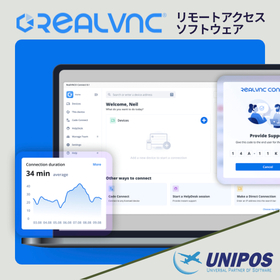
VNC Connect (RealVNC) Remote Access

Remote access software that enables secure remote control and flexible device connectivity.

VNC Connect is remote access software provided by RealVNC. It allows you to securely connect to PCs and servers located remotely, enabling you to check and operate their screens. It is easy to use over the internet and is suitable for remote management of devices located in multiple locations such as laboratories, offices, and field sites. Since you can access necessary devices without having to be physically present, it also helps reduce maintenance response times and operational burdens. The communication is encrypted and includes authentication features, making it easy to operate while ensuring security. Additionally, it supports a wide range of environments, including Windows, macOS, Linux, iOS, and Android, allowing use across different devices. The ability to choose between cloud connection and direct connection is also appealing, as it allows for configurations tailored to network environments and operational policies. It is utilized in various scenarios, including research and development, IT management, remote support, and maintenance of equipment PCs.

  • Other Software
  • Access Software

Added to bookmarks

Bookmarks list

Bookmark has been removed

Bookmarks list

You can't add any more bookmarks

By registering as a member, you can increase the number of bookmarks you can save and organize them with labels.

Free membership registration

MobaXterm Professional Edition

Simplify remote connections with MobaXterm Professional! A must-have tool for professionals that consolidates a variety of features into one.

MobaXterm Professional Edition is an advanced all-in-one remote computing software that operates on Windows. It is designed for professionals who require remote access to servers, systems, and networks. With MobaXterm Professional, you can simplify remote connections. It is an essential tool for professionals that consolidates a variety of features into one. 【Main Features (Excerpt)】 ■ Equipped with a unique terminal that allows direct execution of Unix commands on Windows without installation ■ Supports remote connections using multiple protocols such as SSH, RDP, FTP, and VNC ■ Built-in graphical SFTP file browser that supports drag-and-drop ■ Implements a multi-tab interface for efficiently managing multiple remote sessions ■ Includes an integrated X server that can display remote Linux GUI applications on Windows ■ Portable design that requires no installation and can be launched from a USB memory stick *For more details, please refer to the related links or feel free to contact us.

  • Company:B7
  • Price:Other
  • IT Control and Services
  • Access Software

Added to bookmarks

Bookmarks list

Bookmark has been removed

Bookmarks list

You can't add any more bookmarks

By registering as a member, you can increase the number of bookmarks you can save and organize them with labels.

Free membership registration